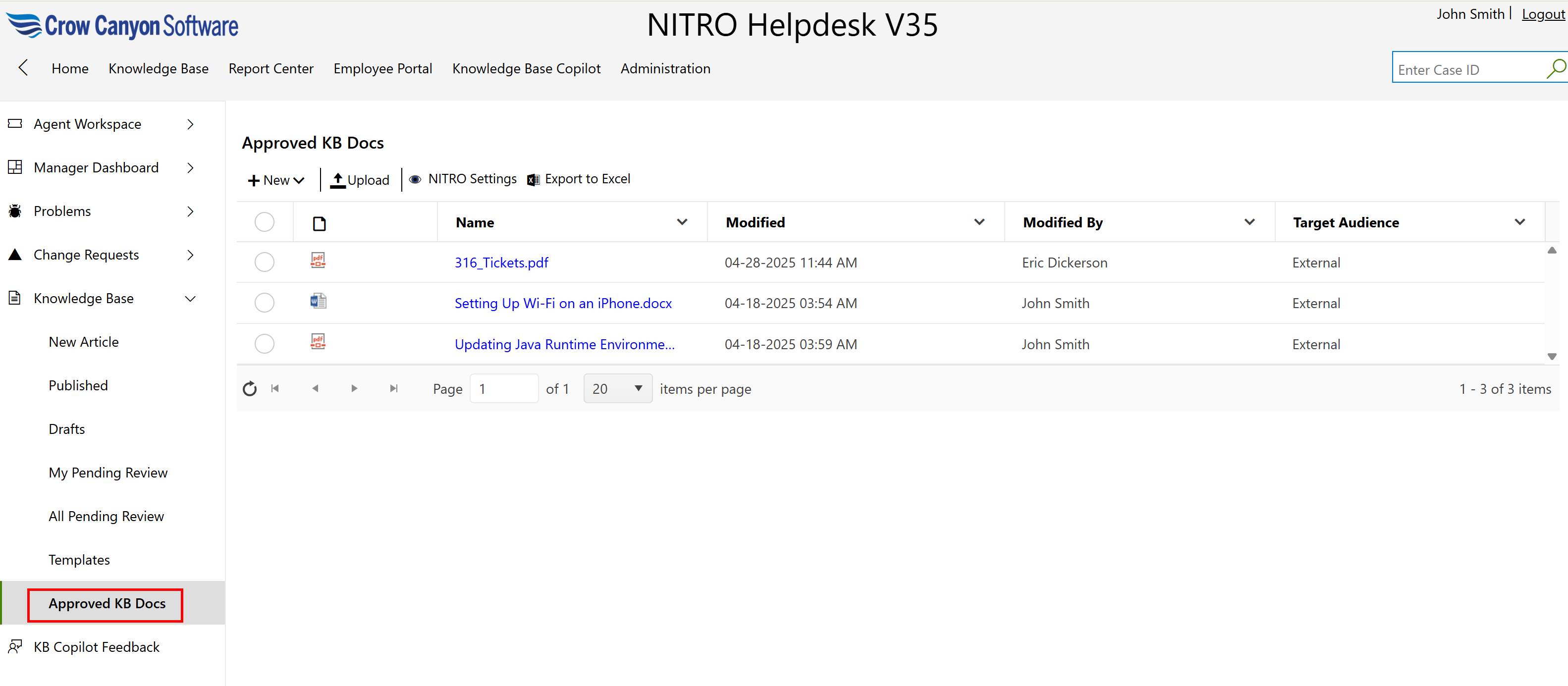
Approved KB Docs
This section lists knowledge base (KB) documents that have been reviewed, approved, and are ready for use by end users or support staff. These documents provide guidance on common issues, how-tos, and technical procedures.
Key Features in the View:
1.Document List:
oEach row represents an approved document.
oExample documents:
▪316_Tickets.pdf
▪Setting Up Wi-Fi on an iPhone.docx
▪Updating Java Runtime Environment...
2.Document Name (Linked):
oClickable links allow users to open and view/download the document.
3.Modified Date:
oShows when the document was last updated.
oHelps track the most recent content changes.
4.Modified By:
oDisplays the name of the person who last updated the document.
5.Target Audience:
oIndicates who the document is intended for (e.g., External users like customers or internal staff).
Available Actions:
At the top of the list:
•New: Add a new KB document.
•Upload: Upload an existing file to the list.
•NITRO Settings: Customize settings specific to this list.
•Export to Excel: Download the document list as an Excel file for offline viewing or reporting.