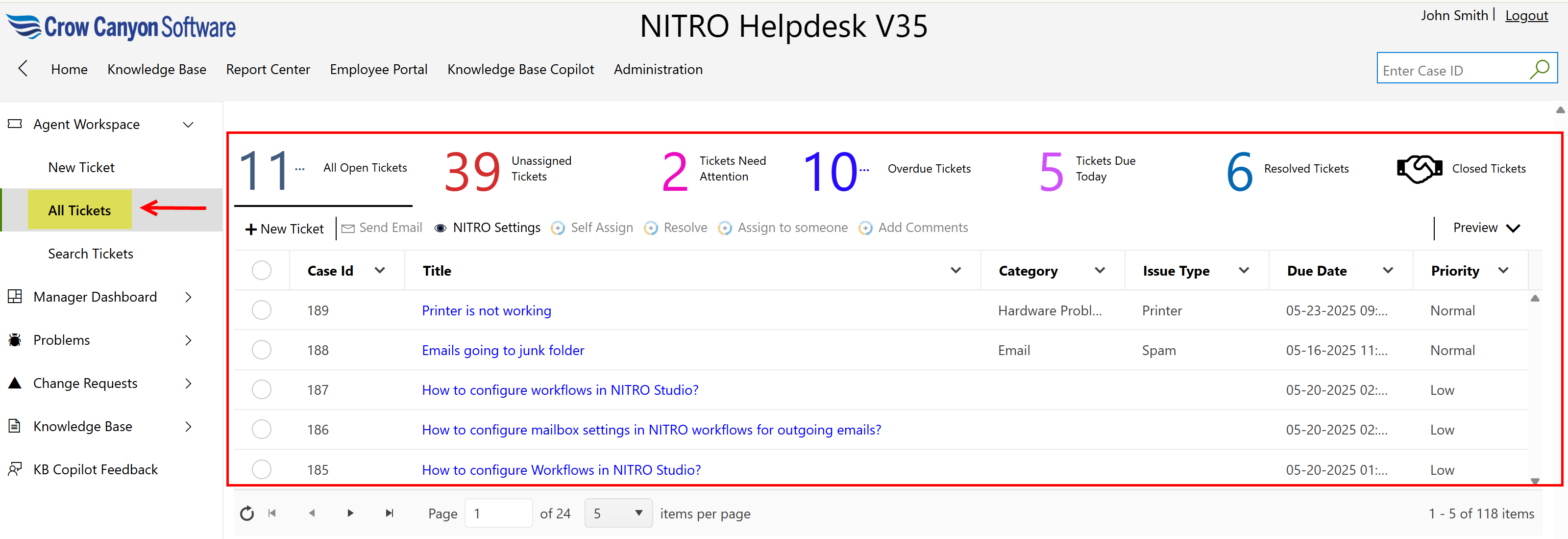
This page provides multiple views to display tickets at various stages, such as open, unassigned, needing attention, overdue, due today, resolved, and closed. Users can also view all tickets, including those they have created themselves.
•The page shows tickets grouped by their status, like open, unassigned, needing attention, overdue, due today, resolved, and closed.
•Users can also view all tickets, including those they created themselves.
•Each group displays the number of tickets it contains (for example, All Open Tickets, Unassigned Tickets).
•This helps users quickly filter and find tickets based on status or priority.
•Users can see key ticket details such as Case ID, Title, Type, Issue, Due Date, and Priority.
•There are options to create new tickets or take actions like sending emails, assigning tickets, resolving issues, and adding comments.
•Users can easily track the tickets they created to follow up on their own requests.